Layering tutorial by the_new_powder99999
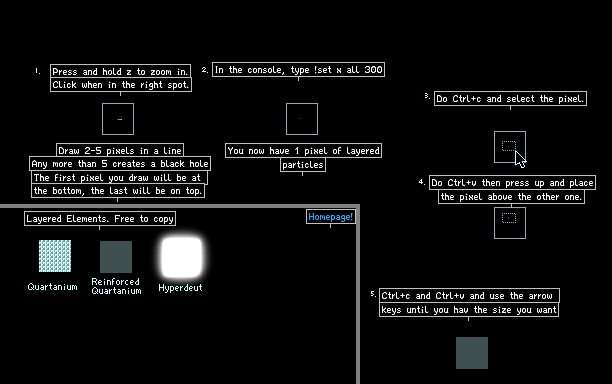

Due to popular request, I have created a layering tutorial.
layering
layer
tutorial
powder99999
Comments
-
polarvolcano 5th Jul 2014
 Thank you. I can't express how grateful I am for this.
 -
mr_snrub 7th Feb 2014
 so usefull
 -
the_new_powder99999 27th Jul 2013
 Heh, I knocked myself off front page (Derp)
 -
the_new_powder99999 27th Jul 2013hittox showed me how before, I might add that way in soon but I am making other saves so I don't have the time.
-
Ourous 27th Jul 2013
 @the_new_powder99999 draw with energy, then paste a stamp underneath it, then !set type energy to whatever you want. Create new stamp, rinse and repeat.
 -
Ourous 27th Jul 2013@the_new_powder99999 My method works with as many layers as you want. See 1265346 for example, used my method there.
-
Clockuser 26th Jul 2013
 I usually set the deuts life to 99999999999999999999 (20 9's) if it works it will be pink and a single pixel will fill half the screen.
 -
ThePersonToTheRight 26th Jul 2013
 if you layer too much it creates a black hole element, if you find a way to fix that i will love you
 -
BigPig 26th Jul 2013
 plz add this id:1268434
 -
malatrix 26th Jul 2013
 oh and new powder forgot to tell ya USE MY SUPER METAL im trying to be a tpt scientist wich is my best bet for being popular on tpt (ad my name on the save you put on the super metal)